Mira / Automation and AI / Payment calendar

A payment calendar for your company

We show how much money will be in your accounts on each of the coming days: what clients will pay in, what goes out to suppliers, taxes and payroll. You see a shortfall early, while there's still time to cover it.

Sound familiar?

Where time and money leak

The spreadsheet lags behind the bank

One person keeps it, the numbers get updated now and then, and a broken formula is noticed when it's too late.

The cash gap shows up on payment day

You find out there isn't enough for payroll or a supplier when nothing can be moved anymore.

Payments get approved in chat

An invoice goes into a chat, someone approves it, someone doesn't, and nobody knows what can be paid today.

What's included · 7

What we do

01

Accounts and companies

All bank accounts and legal entities in one calendar, with income and expense categories the way you're used to.

02

Day-by-day plan

Client payments, supplier payments, taxes and payroll for every day ahead.

03

Recurring payments

Rent, subscriptions and payroll are entered once, then appear in the calendar on their own.

04

Approvals

Each invoice goes to the person who signs off payments, such as the chief accountant or the owner. The calendar shows what's approved.

05

Bank statements

Upload a statement file from any bank, or connect the bank directly if it has an API.

06

Cash gaps in advance

The calendar shows the day money runs short and which payments can be moved.

07

Summary

Balances and payments for the week, sent to the owner in Telegram or by email.

Price and terms

from $290

The price depends on the number of companies and accounts, how statements are loaded, approval rules and reports.

First stepFree review of how you track money
PaymentQuoted after the review, before the contract.
ContractA written contract covering scope, price and payment.
TimelineNamed together with the price after the review — before you pay.
Projects

What it looks like in practice

Payment calendar for several companies
Finance

Payment calendar for several companies

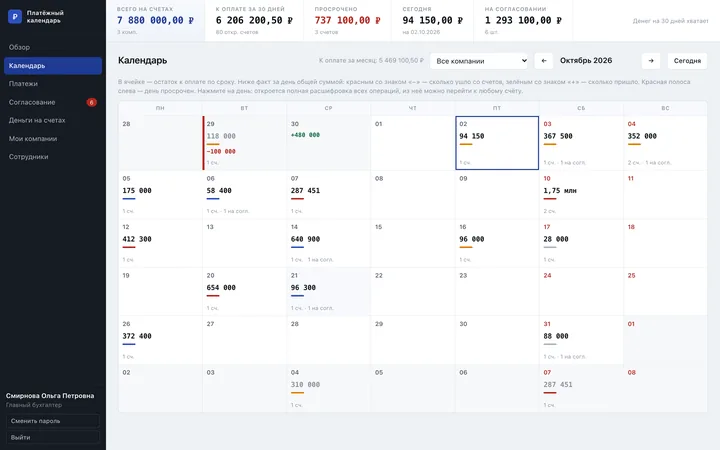
Invoices from several companies in one calendar, so you can see in advance whether there's enough money for upcoming payments.

  • Payment due dates by day and balances by bank
  • Invoice approval by the chief accountant
  • Cash gap forecast 30 days ahead
  • Recurring payments appear a year ahead on their own

In detail

The essentials

01

What a payment calendar shows

It's a day-by-day plan of cash flow: how much comes in, how much goes out and how much is left. It answers the question every owner asks sooner or later: will there be enough money for everything we have to pay in the next few weeks?

A profit report shows how the month ended. The calendar shows a specific day. That's why it warns you about a shortfall before it happens.

02

When a spreadsheet is no longer enough

With one account and a few payments, a spreadsheet copes. With several companies, accounts at different banks and more than one person approving payments, it starts to fall behind, and decisions get made on old numbers.

We built a payment calendar for several companies at once: payment due dates, approval by the chief accountant, balances by bank and a 30-day forecast, all in one window.

03

Connecting the bank, accounting software and CRM

You can upload a statement file from any bank, or connect the bank directly if it has an API. Expected income can come from deals in your CRM, and data for the accountant can go to your accounting software, such as QuickBooks or Xero.

Questions

Questions: Payment calendar

How much does a payment calendar cost?

From $290. We give you the exact price after a free review, before you sign anything. It depends on the number of companies and accounts, statements and approval rules.

Will it work with our bank?

You can upload a statement file from any bank. If your bank has an API, we'll connect it directly.

Do we need accounting software?

No. The calendar works on its own, and if you already use accounting software, it can exchange data with it.

Who will see the numbers?

Only the people you give access to. The owner can see everything, an accountant only their companies and approvals.

Let's talk

Let's discuss your project

Leave your contact and we'll suggest where to start. The homepage concept is free, and you get the price before you pay anything.

Send a request

What you need
Add details
We can't accept the request without your consent

or

Message on Telegram

Tell us about your project

Leave your contact — we'll ask a few questions and suggest a solution.

What you need
Add details
We can't accept the request without your consent

or

Message on Telegram
Discuss your project